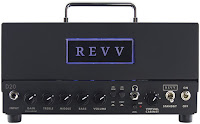
How’s this for a cool idea? An all-tube preamp with a nice assortment of built-in cabinet emulations for direct recording. But’s it’s also a 20-watt amp head fueled by two 6V6 power tubes and capable of driving speaker cabinets. And oh—it’s roughly the size of a toaster and weighs about as much as your guitar. Yup, that pretty much describes the D20 from Canada’s Revv Amplification. It’s an ingenious concept, expertly realized, and enhanced by many clever and useful features.
To use the D20 without a cabinet, you connect to a DAW or mixing desk via the rear-panel XLR out. There’s also a standard 1/4" jack for connecting a cab. The D20 is a reactive load box, so you don’t need to connect any speakers. But if you do, you can drive a cab and record your direct signal simultaneously. The rear panel also includes a mono effects loop (buffered and in series), a USB jack for installing and editing speaker emulations via computer, and external terminals for biasing the power tubes without disassembling the chassis. There’s also an old-school MIDI-in jack for remotely switching cab emulations.
There are no on board controls to adjust the Torpedo sounds, but you can edit their parameters using a free Two Notes app. You can also purchase additional cabinet IRs through the app, and store up to 128 of them within the D20. But you can still only access six of them without connecting to a computer or MIDI controller.

from premierguitar.com article

Familiar Feel
The amp’s front panel controls are straightforward: gain, treble/mid/bass, and master volume. The gain control employs a push/pull pot, with hotter, more distorted sounds in the out position. There’s also a headphone-out jack with a level control, a switch to lower the amp’s power from 20 to 4 watts, and a rotary switch to select one of six on board cabinet emulations. (More on those in a moment.)To use the D20 without a cabinet, you connect to a DAW or mixing desk via the rear-panel XLR out. There’s also a standard 1/4" jack for connecting a cab. The D20 is a reactive load box, so you don’t need to connect any speakers. But if you do, you can drive a cab and record your direct signal simultaneously. The rear panel also includes a mono effects loop (buffered and in series), a USB jack for installing and editing speaker emulations via computer, and external terminals for biasing the power tubes without disassembling the chassis. There’s also an old-school MIDI-in jack for remotely switching cab emulations.
Damn, the Torpedo!
According to Revv, the D20 is the first amplifier to integrate Two Notes’ Torpedo cabinet emulation software. Torpedo products, which combine speaker cabinet impulse responses with power amp and room emulations, have acquired a fervid following among metal and hard rock players. The D20 offers a sort of “Torpedo light,” with six emulations (rather than Torpedo’s usual 32) selectable via that front-panel switch.There are no on board controls to adjust the Torpedo sounds, but you can edit their parameters using a free Two Notes app. You can also purchase additional cabinet IRs through the app, and store up to 128 of them within the D20. But you can still only access six of them without connecting to a computer or MIDI controller.

The Verdict
The Revv D20 is an innovative product with many possible applications. To my ear, it’s best-suited for high-gain tones—especially with ambient effects added. The D20 could live on a studio desktop, driving cabinets while serving as a direct recording preamp. It would also be valuable whenever size and weight are issues. It could easily fit into an overhead bin or beneath a seat on a flight. The price is fair too, considering the D20’s North American manufacture and the formidable R&D required to produce this innovative and useful tool.from premierguitar.com article
Comments
Post a Comment